
Comparison
Zoom vs Google Meet for businesses in Luxembourg
Google Meet in the Business Standard bundle at 13.60 EUR net is the cheaper choice for most SMEs, while Zoom offers 300 participants, 30 hours and SSO from 17.49 EUR.
The verdict
- Google Workspace Business Standard with Meet and Gemini costs 13.60 EUR net per user, 15.91 EUR gross, Zoom Workplace Pro 13.33 EUR net with annual billing.
- Zoom Business allows 300 participants and meetings of up to 30 hours, Google Business Standard 150 participants and 24 hours.
- The Zoom AI Companion name was retired in June 2026, its AI features remain in paid plans, and ZoomMate costs extra.
- Both can store recordings in Europe, while full EU processing is only available on enterprise plans.
Head to head
Zoom Workplace
- Price from
- €13.33
- Best for
- Companies with many and large meetings
Google Meet
- Price from
- €6.80
- Best for
- SMEs that want an office bundle with meetings
The facts
| Criterion | Zoom Workplace | Google Meet |
|---|---|---|
| From | €13.33 | €6.80 |
| per month | per user / month, Workplace Pro, billed annually, excl. VAT | per user / month, in Google Workspace Business Starter, annual commitment, excl. taxes |
| Free tier | Yes | Yes |
| Trial | Not published | 14 days |
| Headquarters | US | US |
| Founded | Not published | Not published |
| Editorial score | Not published | Not published |
| Best for | Companies with many and large meetings | SMEs that want an office bundle with meetings |
Scroll the table sideways to see every column.
For most Luxembourg SMEs, Google Meet is the cheaper choice if they need email, calendar and documents anyway: Business Standard costs 13.60 EUR net per user per month and includes Meet with 150 participants, recording and Gemini.
Zoom pays off for companies that mainly run meetings and webinars, need longer sessions or work with clients used to Zoom: Workplace Pro costs 13.33 EUR net, Business with 300 participants and SSO 17.49 EUR, both with annual billing.
We read all prices on the vendors' pages on 20.11.2026. Both vendors show euro prices for Luxembourg and state explicitly that taxes are not included, so no dollar conversion was needed. We calculate gross prices with 17 % TVA, relevant for businesses that cannot reclaim VAT. We leave out introductory discounts for new customers. No vendor paid for this comparison, and we did not run our own tests.
What is new at Zoom and Google Meet?
First, an important point: the name Zoom AI Companion no longer exists. Zoom retired the brand in June 2026. According to the Zoom blog of 24.06.2026, AI features such as meeting summaries, in-meeting questions and chat compose are still included in paid Workplace plans and are now simply named after what they do. New is ZoomMate, a separate paid add-on that, according to Zoom's press release of 01.06.2026, carries out follow-up work after a meeting. If your internal AI policy approved AI Companion, that does not automatically approve ZoomMate.
At Google, the AI in Meet is called Gemini in Meet. It is included in Workspace plans from Business Standard upwards, not in Business Starter, as shown on the Google Workspace pricing page and the Meet feature comparison.
What do Zoom and Google Meet cost?
Zoom sells meetings as part of Zoom Workplace, while Google sells Meet only inside the Google Workspace bundle with Gmail, Calendar, Drive and Docs. That skews the comparison: with Google you pay for the whole office suite, with Zoom mainly for communication.
| Plan (per user per month) | Net, annual contract | Gross with 17 % TVA | Net, monthly term | Gross with 17 % TVA |
|---|---|---|---|---|
| Zoom Workplace Basic | free | free | free | free |
| Zoom Workplace Pro | 13.33 EUR | 15.60 EUR | 15.99 EUR | 18.71 EUR |
| Zoom Workplace Business | 17.49 EUR | 20.46 EUR | 20.99 EUR | 24.56 EUR |
| Zoom Workplace Enterprise | on request | on request | on request | on request |
| Google Workspace Business Starter | 6.80 EUR | 7.96 EUR | 8.10 EUR | 9.48 EUR |
| Google Workspace Business Standard | 13.60 EUR | 15.91 EUR | 16.20 EUR | 18.95 EUR |
| Google Workspace Business Plus | 21.10 EUR | 24.69 EUR | 25.30 EUR | 29.60 EUR |
| Google Workspace Enterprise | on request | on request | on request | on request |
Sources: Zoom pricing page ("excludes VAT") and Google Workspace pricing page ("does not include taxes" on the German page), both accessed on 20.11.2026.
Two billing differences: according to its pricing page, Zoom charges the annual price as a single upfront payment, and the monthly figure is for comparison only. Google bills monthly even on an annual contract. Google sells Business Starter, Standard and Plus for a maximum of 300 users per company.
The AI add-on ZoomMate costs 15.33 EUR per user per month billed annually and 18.40 EUR billed monthly, with 2,200 AI credits per month, according to the Zoom product page. The page does not say whether taxes are included, so we treat the amounts as net: 17.94 EUR and 21.53 EUR gross. At launch in June, Zoom named only North America, with Europe to follow later. Whether ZoomMate is fully available to companies in Luxembourg only becomes clear at checkout.
Example for 10 people, annual contract, net: Zoom Workplace Pro about 1,600 EUR a year, Zoom Business about 2,100 EUR, Google Workspace Business Standard 1,632 EUR. With Google, that already includes email, 2 TB of storage per person and office apps.
How many participants and for how long?
| Plan | Participants per meeting | Maximum length |
|---|---|---|
| Zoom Workplace Basic (free) | 100 | 40 minutes |
| Zoom Workplace Pro | 100, more with the Large Meeting add-on | 30 hours |
| Zoom Workplace Business | 300, more with the Large Meeting add-on | 30 hours (as Pro) |
| Zoom Workplace Enterprise | 1,000 | 30 hours (as Pro) |
| Personal Google account (free) | 100 | 60 minutes with 3 or more people, 24 hours one-on-one |
| Google Workspace Business Starter | 100 | 24 hours |
| Google Workspace Business Standard | 150 | 24 hours |
| Google Workspace Business Plus | 500 | 24 hours |
| Google Workspace Enterprise Standard | 500 | 24 hours |
| Google Workspace Enterprise Plus | 1,000, view only after 500 | 24 hours |
Sources: Zoom pricing page, Meet feature comparison and Meet help on limits.
Both entry plans are enough for a typical SME. The difference shows at client events: Zoom Business allows 300 participants for 17.49 EUR, while Google needs Business Plus at 21.10 EUR for that.
Which features do you get?
| Feature | Zoom Workplace Pro | Zoom Workplace Business | Google Business Starter | Google Business Standard | Google Business Plus |
|---|---|---|---|---|---|
| Recording | yes, 10 GB cloud storage per user | yes | no | yes, in Drive | yes, in Drive |
| AI notes and summaries | yes, unlimited | yes, unlimited | no | yes | yes |
| Attendance report | not stated on the pricing page | not stated on the pricing page | no | no | yes |
| SSO for staff | no | yes | SAML profile in the Admin console | SAML profile in the Admin console | SAML profile in the Admin console |
| Other apps | Chat, internet calling, Whiteboard, Zoom Mail, Calendar | plus unlimited booking pages and whiteboards | Gmail, Drive 30 GB | Gmail, Drive 2 TB, Docs with Gemini | Gmail, Drive 5 TB, Vault |
From Business Standard, Google also lists breakout rooms, polls, Q&A, waiting rooms and transcripts saved to Drive. Business Starter does not have these features.
Sources: Zoom pricing page, Google Workspace pricing page, Meet feature comparison.
What can the AI assistants do?
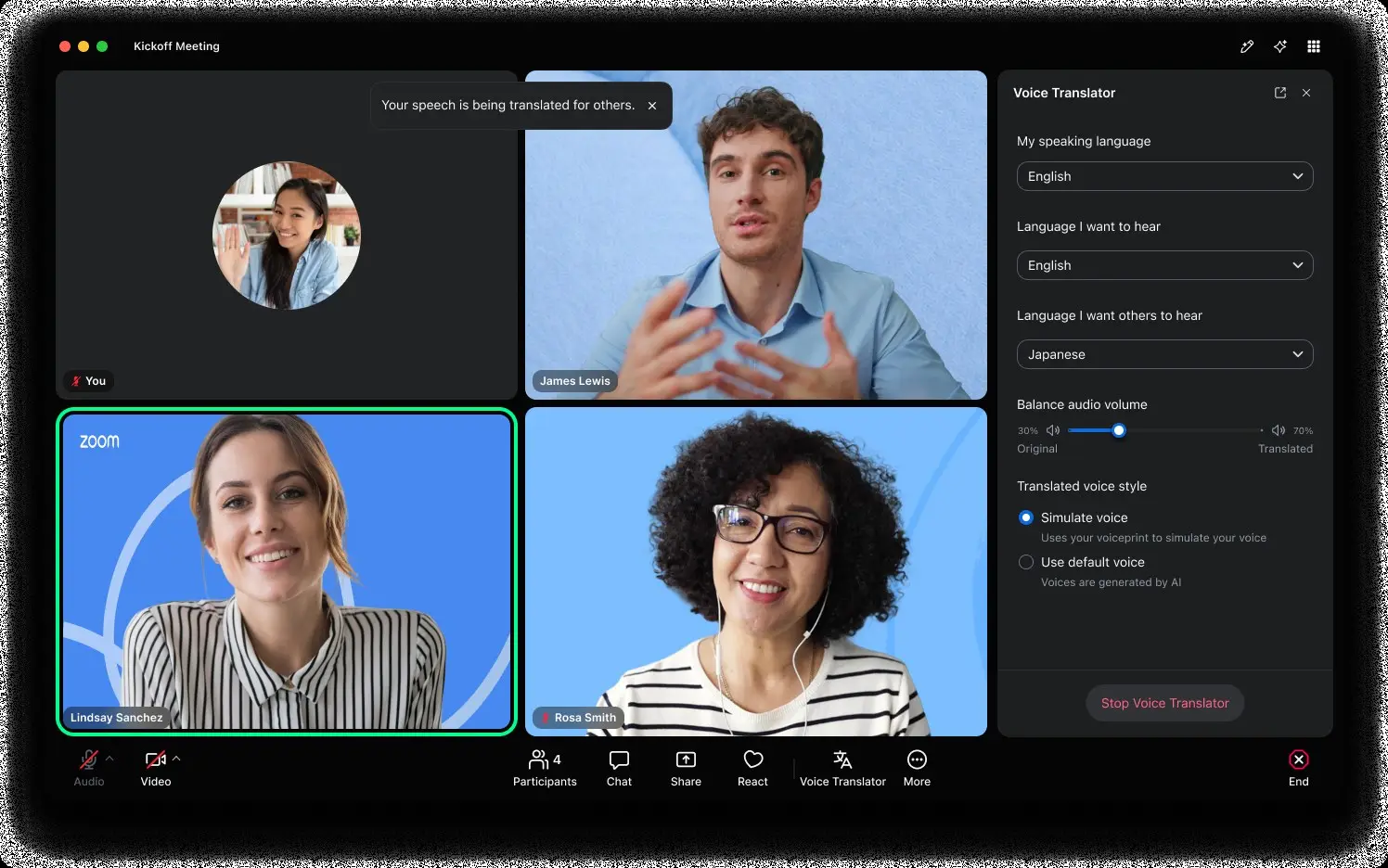
Zoom (formerly AI Companion): According to the pricing page, Workplace Pro and Business include unlimited meeting summaries, unlimited in-meeting questions, the My Notes AI note taker for Zoom, third-party and in-person conversations, and eight custom summary templates per month. The free Basic plan allows summaries for three meetings a month. Zoom lists translated captions only in the Enterprise plan. Zoom's product page lists the live speech translation Voice Translator as part of ZoomMate. According to Zoom in 2024, summaries and in-meeting questions support 36 languages, then in preview, and detect the spoken language automatically.
ZoomMate goes further: it searches meetings, chats, documents and connected apps such as Salesforce, Jira or Google Drive, schedules follow-ups, creates presentations and reports and builds workflows. It is a separate product with its own price, see above.
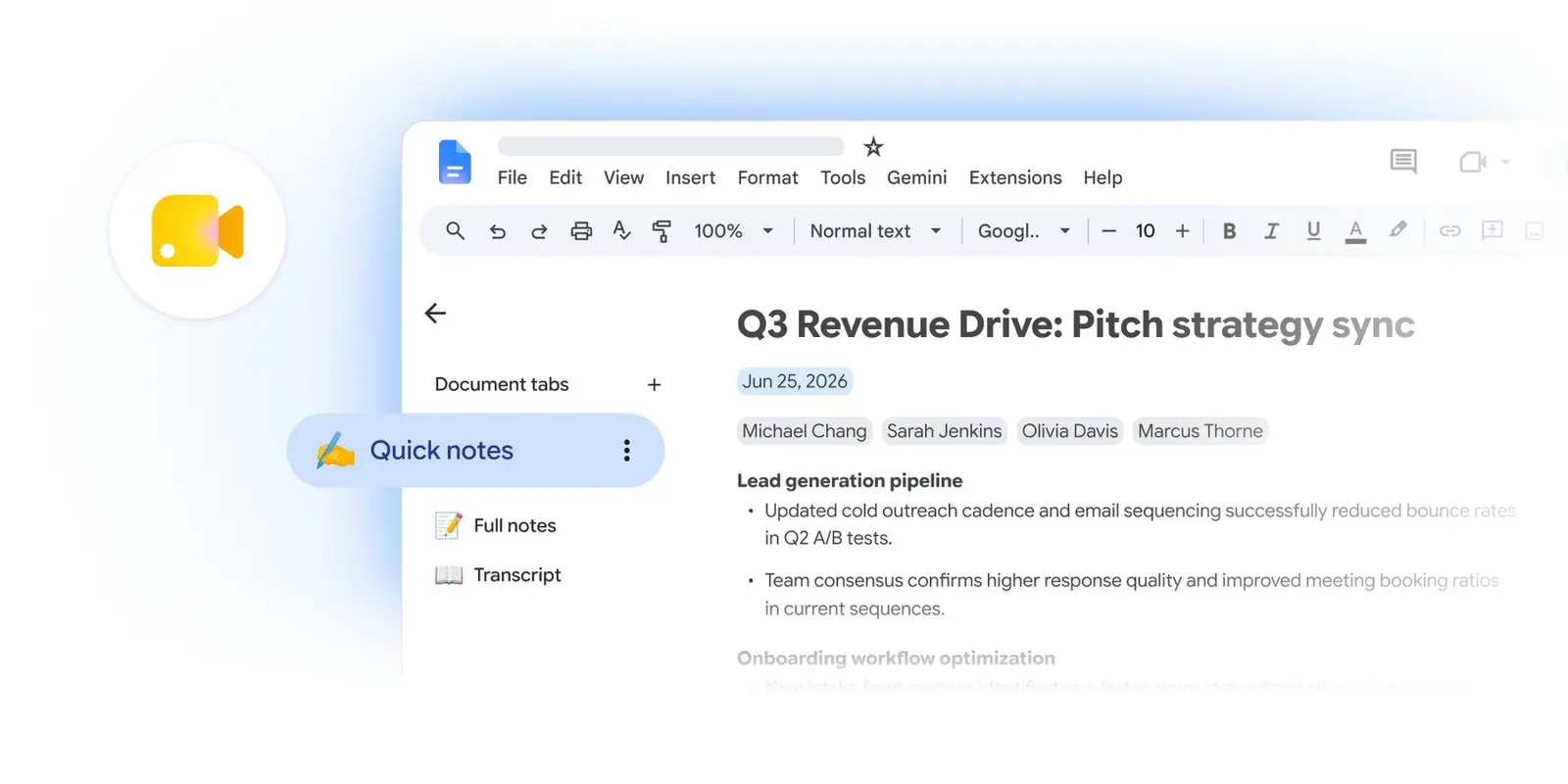
Gemini in Meet: From Business Standard, Take notes for me writes the notes into a Google document and sends the organiser a link afterwards. According to Meet help, it works in German, French, English and five other languages, but only with one language per meeting. Since 29.09.2026, automatic note-taking is pre-set to on in Business Standard and Plus according to Google, and admins can change that. Since October 2026, speech translation translates spoken language in real time across 63 languages according to Google, for up to 90 minutes per meeting on the base plans. Guests from other companies can use it when the organiser has an eligible plan.
Important for Luxembourg: both cover German, French and English. We found no evidence of Luxembourgish support at either vendor. According to Google's help, mixed meetings that switch between languages are not supported by its note-taking feature.
Where does the data stay?
Zoom: According to Zoom help, all paid accounts, including Pro, can choose the storage location for cloud recordings, transcripts, recorded chats and whiteboards, for example Germany. Account and operational data stay in the US, though. For live traffic, admins can select data centres in the EU according to Zoom's GDPR page. If you do not want any personal data to go to the US, you need the Zoom EU Infrastructure: according to the Zoom fact sheet, it is only open to education and enterprise customers. Even there, exceptions apply, for example for reviews by the Trust and Safety team in the US.
Google: According to Google help on data regions, Business Standard and Plus include "Fundamental Data Regions". That lets you store Meet recordings, transcripts, attendance reports, polls and questions, as well as Gemini prompts and responses, at rest in Europe, with one policy for the whole company. Processing in use in the EU is only covered by "Enterprise Data Regions", included in Enterprise Plus or available as an add-on. Business Starter has no data regions. Google does not list the live audio and video of a meeting on this page.
| Zoom | Google Meet | |
|---|---|---|
| Store recordings and transcripts in Europe | from Pro, region Germany | from Business Standard, region Europe |
| Processing in the EU | Enterprise with EU Infrastructure | Enterprise Plus or Enterprise Data Regions add-on |
| Account and operational data | US, except with EU Infrastructure | not part of data regions |
What about GDPR, data processing agreements and training?
According to its GDPR page, Zoom builds its Data Processing Addendum (DPA) into its terms of service for all customers. For transfers to the US, Zoom cites its participation in the EU-US Data Privacy Framework and standard contractual clauses. According to its privacy statement, Zoom does not use audio, video, chat, screen sharing or attachments to train its own or third-party AI models. For AI, Zoom uses its own models and third-party models such as OpenAI and Anthropic. According to Zoom help on AI data, zero data retention applies with these providers, with exceptions for safety checks.
Google bases Workspace on the Cloud Data Processing Addendum, last modified on 30.10.2026. For Gemini in Workspace, Google says in its generative AI privacy hub that content is not reviewed by humans or used to train AI models outside your domain without permission. For speech translation, Google says voice data is neither stored nor used for training.
For Luxembourg companies, the same applies to both: if you record, transcribe or automatically summarise meetings, you process personal data. Inform participants beforehand, set retention periods and add the tools to your record of processing activities. The CNPD answers GDPR questions. In Meet, Google offers a consent prompt before recording and notes, which admins can switch on.
What about admin and SSO?
Zoom: According to Zoom help, SAML single sign-on is available from Business and requires an approved custom Zoom address (vanity URL). Pro has no SSO. According to the pricing page, Business also adds managed domains, device management and information barriers.
Google: Workspace is an identity provider in its own right. If you use Microsoft Entra, Okta or another provider, you set up a SAML profile in the Admin console according to Google help. Admins control all Meet and Gemini settings centrally, including per department.
Which suits which business?
| Zoom | Google Meet | |
|---|---|---|
| Cheapest business plan, net | 13.33 EUR (Pro, annual) | 6.80 EUR (Starter, annual, without Gemini in Meet) |
| With AI notes, net | 13.33 EUR (Pro) | 13.60 EUR (Business Standard) |
| Participants in the entry plan | 100 | 100 (Starter), 150 (Standard) |
| Maximum length | 30 hours | 24 hours |
| SSO | from Business, 17.49 EUR | via Google Admin |
| EU storage of recordings | from Pro | from Business Standard |
| Email and office apps included | only Zoom Mail and Calendar | Gmail, Drive, Docs, Sheets |
Choose Google Meet if you already use Google Workspace or need email and documents anyway. Business Standard is then the best package: AI notes in German and French, 150 participants, recording and storage in Europe for 13.60 EUR net.
Choose Zoom if your company uses Microsoft 365 for email and documents but wants a strong meeting tool, or if you often hold large client meetings and long sessions. Business gives you 300 participants and SSO for 17.49 EUR net.
If you already have Microsoft 365, check before buying whether Teams is enough, see our comparison Slack vs Microsoft Teams. We compare the office suites' AI packages in Microsoft 365 Copilot vs Gemini for Google Workspace, and the new AI models in GPT-6.2 vs Gemini 4 Neon.
What is still open?
- Zoom's product page does not say whether ZoomMate is fully available in Luxembourg or whether the euro price includes taxes.
- We derive the maximum meeting length for Zoom Business and Enterprise from "All of Workplace Pro", as there is no separate figure.
- The language list for Zoom summaries dates from 2024, and we found no current list.
- Google's data regions page does not say whether the live audio of a Meet call is processed in Europe.
Weekly, Thursday morning, Central European Time.
The Thinking briefing
One email a week: what changed in European business software, which prices moved, and which comparison we published. No sales mail.
Questions and answers
Is Google Meet cheaper than Zoom?
How many participants do Zoom and Google Meet allow?
Does Zoom AI Companion still exist?
Can the data stay in the EU?
Sources
- [1] Plans & Pricing (Zoom Workplace) accessed 2026-11-20
- [2] Google Workspace pricing (EN) accessed 2026-11-20
- [3] Google Workspace Preise (DE) accessed 2026-11-20
- [4] Meet ZoomMate: Zoom's next chapter in AI (Zoom blog, 24.06.2026) accessed 2026-11-20
- [5] Zoom launches ZoomMate (Zoom press release, 01.06.2026) accessed 2026-11-20
- [6] ZoomMate product page (Zoom) accessed 2026-11-20
- [7] Zoom AI Companion expands language support (Zoom, 27.02.2024) accessed 2026-11-20
- [8] Managing Data & Storage location (Zoom Support) accessed 2026-11-20
- [9] GDPR (Zoom Trust Center) accessed 2026-11-20
- [10] Zoom EU Infrastructure Fact Sheet accessed 2026-11-20
- [11] Zoom Privacy Statement accessed 2026-11-20
- [12] How Zoom AI features handle your data (Zoom Support) accessed 2026-11-20
- [13] Configuring Single Sign-On (Zoom Support) accessed 2026-11-20
- [14] Zoomtopia 2026 Media Kit (Zoom) accessed 2026-11-20
- [15] Compare Meet features across Google Workspace editions accessed 2026-11-20
- [16] Learn what requirements you need to use Google Meet (Meet Help) accessed 2026-11-20
- [17] 'Take notes for me' in Google Meet (Meet Help) accessed 2026-11-20
- [18] New Meet 'Take notes for me' settings take effect 29.09 (Workspace Updates) accessed 2026-11-20
- [19] Real-time speech translation in Meet expands to 63 languages (Workspace Updates) accessed 2026-11-20
- [20] October Workspace Drops (Google Workspace Blog) accessed 2026-11-20
- [21] Google Workspace Data Regions (Workspace Help) accessed 2026-11-20
- [22] Cloud Data Processing Addendum (Google) accessed 2026-11-20
- [23] Generative AI in Google Workspace Privacy Hub accessed 2026-11-20
- [24] Setting up SSO (Workspace Help) accessed 2026-11-20
- [25] Commission nationale pour la protection des données (CNPD) accessed 2026-11-20